
WordPress multi-tenancy enables a single WordPress installation to serve multiple clients or projects while maintaining data isolation and operational efficiency. This architectural approach allows SaaS providers, agencies, and enterprise platforms to manage dozens or hundreds of WordPress instances from a unified infrastructure.
What Is WordPress Multi-Tenancy?
Multi-tenancy in WordPress refers to architectural patterns where a single WordPress codebase or infrastructure serves multiple independent tenants (clients, customers, or projects) while ensuring data isolation and security boundaries. Unlike WordPress Multisite, which is WordPress's native multi-site solution, multi-tenancy encompasses various technical approaches for serving multiple WordPress instances efficiently.
The core principle involves sharing resources (server capacity, code, databases) while maintaining logical separation between tenants. This approach reduces operational overhead, simplifies updates and maintenance, and uses server resources more efficiently than managing individual WordPress installations.
According to Automattic's usage statistics, over 35% of enterprise WordPress deployments use some form of multi-tenancy pattern (2025). The choice between different multi-tenancy patterns depends on factors like tenant isolation requirements, compliance needs, customization flexibility, and operational scale.
WordPress Multi-Tenancy Architecture Patterns
Shared Database with Table Prefixes
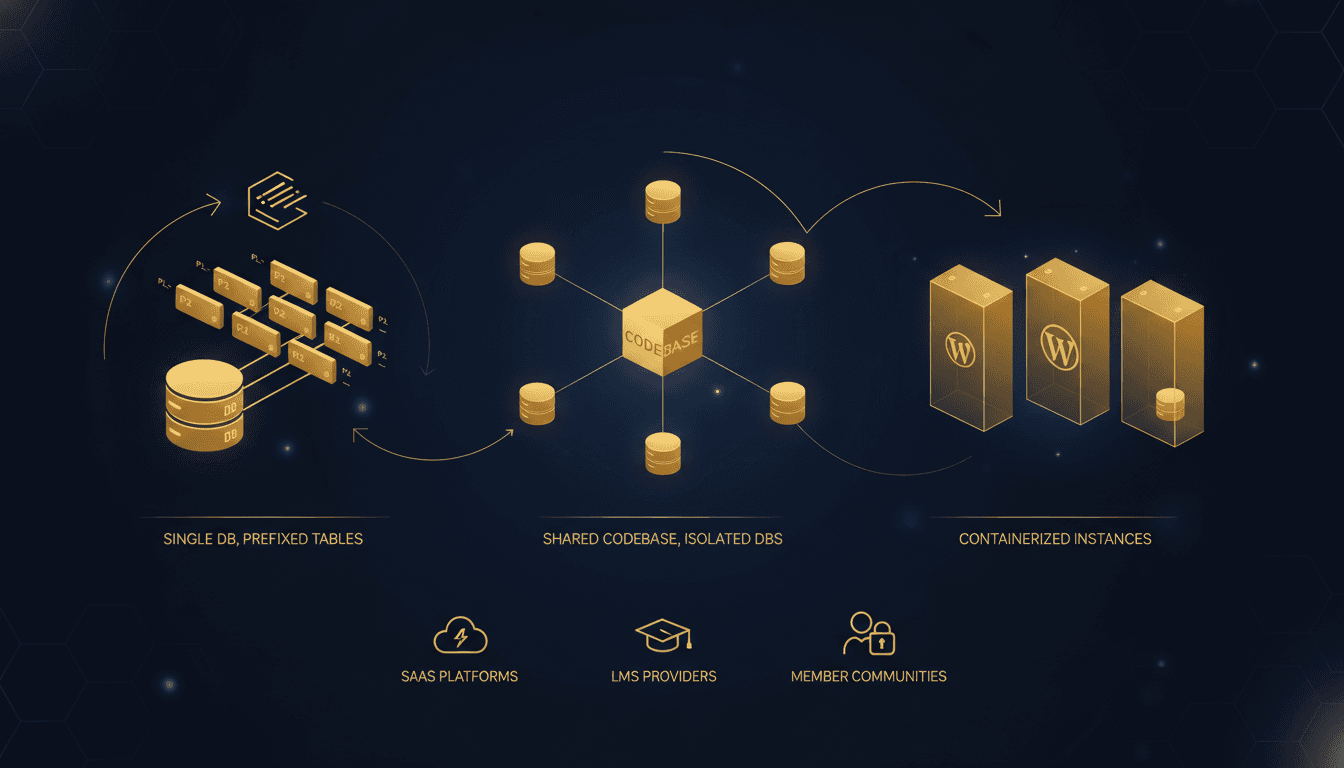
The shared database pattern uses a single MySQL database with unique table prefixes for each tenant. WordPress's native $table_prefix configuration enables this approach by prepending tenant identifiers to all database tables.
Implementation approach:
- Single WordPress installation with dynamic prefix switching
- Tenant identification via subdomain, domain, or URL parameter
- Shared
wp-config.phpwith runtime prefix determination - Common file system for WordPress core, themes, and plugins
This pattern offers maximum resource efficiency since all tenants share database connections, query cache, and storage. Database maintenance, backups, and monitoring operate on a single instance, reducing operational complexity.
Limitations include:
- Limited tenant isolation (database-level access affects all tenants)
- Shared plugin/theme conflicts can impact multiple tenants
- Difficult to implement tenant-specific customizations
- Compliance challenges for regulated industries requiring data segregation
Isolated Database per Tenant
The isolated database pattern maintains separate MySQL databases for each tenant while sharing the WordPress codebase. Each tenant operates with an independent database connection and complete table isolation.
Architecture components:
- Single WordPress installation with dynamic database switching
- Tenant-specific database credentials and connection handling
- Shared themes, plugins, and core files
- Database routing based on tenant identification
This approach balances resource efficiency with data isolation. Tenant databases can be backed up, restored, and maintained independently, enabling granular data management and compliance with data residency requirements.
Resource scaling considerations:
- Database server capacity becomes the primary bottleneck
- Connection pooling and query optimization critical for performance
- Individual tenant database sizing and growth monitoring required
According to WP Engine's enterprise usage data, isolated database patterns support 50-200 tenants per server before requiring horizontal scaling (2024).
Containerized WordPress Instances
Containerized multi-tenancy deploys each tenant as an independent WordPress container with dedicated resources, file systems, and database connections. This pattern provides maximum isolation and customization flexibility.
Container architecture:
- Docker or Kubernetes-based tenant deployment
- Individual WordPress installations per container
- Dedicated or shared database servers per tenant group
- Load balancing and service discovery for tenant routing
Benefits include complete tenant isolation, independent scaling, and unlimited customization capabilities. Tenants can run different PHP versions, plugin sets, and configurations without affecting others.
Operational complexity:
- Container orchestration and management overhead
- Resource allocation and monitoring per tenant
- Complex backup and migration procedures
- Higher infrastructure costs due to resource duplication
Multi-Tenancy Patterns by Use Case
Different WordPress multi-tenancy patterns align with specific business models and technical requirements:
| Use Case | Recommended Pattern | Tenant Count | Isolation Level | Customization |
|---|---|---|---|---|
| SaaS Platforms | Isolated Database | 10-500 | Medium | Limited |
| Agency Management | Shared Database | 5-50 | Low | Minimal |
| LMS Providers | Containerized | 10-100 | High | Maximum |
| Membership Sites | Shared Database | 50-1000+ | Low | Minimal |
| Enterprise Portals | Containerized | 5-25 | High | Maximum |
| White-label Solutions | Isolated Database | 20-200 | Medium | Moderate |
SaaS Platform Architecture
SaaS platforms typically require moderate tenant isolation with standardized functionality across customers. The isolated database pattern provides sufficient data segregation for most compliance requirements while maintaining operational efficiency.
Technical implementation:
- Tenant identification via subdomain (tenant1.saasplatform.com)
- Database connection switching in
wp-config.php - Shared theme/plugin management with tenant-specific configurations
- API-based tenant provisioning and management
Learning Management Systems (LMS)
LMS providers often need maximum customization flexibility per educational institution or corporate client. Containerized instances enable independent plugin sets, custom themes, and institution-specific integrations.
Container orchestration approach:
- Kubernetes namespace per tenant for resource isolation
- Persistent volumes for tenant-specific file storage
- Database per tenant or shared database clusters
- SSL certificate management and domain routing
Agency and White-label Hosting
Digital agencies managing client WordPress sites benefit from simpler maintenance while preserving client data separation. The isolated database pattern enables independent client backups, staging environments, and selective plugin updates.
Tenant Provisioning and Management
Automated tenant provisioning is critical for scalable multi-tenancy operations. Manual tenant setup becomes impractical beyond 10-20 tenants and introduces inconsistency risks.
A provisioning workflow usually has five stages:
- Tenant registration: customer signup, plan selection, and payment processing
- Resource allocation: database creation, subdomain assignment, storage quotas
- WordPress initialization: database schema installation, admin user creation, default content
- DNS and SSL setup: subdomain propagation, certificate provisioning
- Monitoring integration: performance tracking, uptime monitoring, backup scheduling
Database Provisioning Strategies
For isolated database patterns, automated database creation and configuration management ensures consistent tenant environments:
// Simplified tenant database provisioning
function provision_tenant_database($tenant_id, $db_config) {
    $db_name = "wp_tenant_" . $tenant_id;
    $db_user = "tenant_" . $tenant_id;
    $db_pass = generate_secure_password();

    // Create database and user
    create_database($db_name);
    create_database_user($db_user, $db_pass, $db_name);

    // Install WordPress schema
    install_wordpress_schema($db_name);

    return [
        'database' => $db_name,
        'username' => $db_user,
        'password' => $db_pass
    ];
}
Container-based Provisioning
Containerized multi-tenancy requires orchestration tools for automated deployment, scaling, and lifecycle management:
Kubernetes deployment approach:
- Helm charts for standardized WordPress container deployment
- ConfigMaps for tenant-specific WordPress configuration
- Persistent Volume Claims for tenant file storage
- Services and Ingress for traffic routing
Resource Isolation and Security
Multi-tenant architectures must prevent resource contention and security breaches between tenants. Different patterns offer varying levels of isolation and require specific security measures.
Database-level Isolation
Shared database patterns require careful query optimization and resource limiting to prevent tenant interference:
Query isolation strategies:
- Connection pooling with per-tenant limits
- Query timeout enforcement
- Database query monitoring and alerting
- Resource governor rules for MySQL/MariaDB
File System Security
Shared file system access in database-based multi-tenancy requires strict permission controls:
Security measures:
- Tenant-specific upload directories with restricted permissions
- Plugin/theme file access controls
- Temporary file isolation and cleanup
- Log file separation and rotation
Network Security
All multi-tenancy patterns benefit from network-level security controls:
- Tenant traffic isolation via VLANs or container networks
- Rate limiting per tenant or IP address
- DDoS protection and traffic filtering
- SSL/TLS termination with proper certificate management
Data Segregation and Compliance
Regulatory compliance often dictates multi-tenancy architecture choices, particularly for healthcare (HIPAA), finance (PCI-DSS), or European markets (GDPR).
Compliance requirements shape the architecture in five ways:
- Data residency: physical location of tenant data storage
- Encryption: data-at-rest and in-transit encryption requirements
- Audit trails: detailed logging and access monitoring per tenant
- Data portability: tenant data export and migration capabilities
- Right to deletion: complete tenant data removal procedures
GDPR Compliance Considerations
European tenant data requires specific handling under GDPR regulations:
- Explicit consent tracking per tenant
- Data processing purpose limitation
- Tenant data subject access request handling
- Cross-border data transfer restrictions
- Data breach notification procedures
Containerized instances provide the strongest compliance posture by enabling complete tenant data isolation and independent processing controls.
Scaling Strategies for Multi-Tenant WordPress
Scaling multi-tenant WordPress beyond 100+ tenants requires architectural evolution and optimization strategies specific to each pattern.
Database Scaling Approaches
Vertical scaling means increasing database server resources (CPU, RAM, storage). It works for isolated database patterns up to 200-300 tenants, requires minimal application changes, and is limited by single server hardware constraints.
Horizontal scaling means database sharding across multiple servers, with tenants distributed across database clusters. Routing and connection management get complex, and backup and maintenance need coordination.
Read replicas separate read and write database operations. Query performance for reporting and analytics improves, but you have to account for eventual consistency and implement read/write splitting at the application level.
Caching and Performance Optimization
Multi-tenant caching requires tenant-aware strategies to prevent cache contamination:
Redis/Memcached patterns:
- Tenant-prefixed cache keys
- Dedicated cache instances per tenant group
- Cache invalidation coordination across tenants
Content Delivery Networks (CDNs):
- Shared CDN with tenant-specific cache headers
- Individual CDN configurations per tenant domain
- Edge caching for static assets and media files
For comprehensive WordPress performance optimization beyond multi-tenancy, refer to our detailed speed optimization guide.
Load Balancing and Traffic Distribution
Application-level load balancing:
- Tenant-aware routing based on subdomain or domain
- Session affinity for database connection consistency
- Health checks and automatic failover
Container orchestration scaling:
- Horizontal Pod Autoscaling based on tenant resource usage
- Cluster autoscaling for infrastructure capacity
- Resource quotas and limits per tenant namespace
Monitoring and Observability
Multi-tenant WordPress environments require sophisticated monitoring to track performance, resource usage, and issues across all tenants simultaneously.
Key metrics by tenancy pattern:
| Metric Category | Shared Database | Isolated Database | Containerized |
|---|---|---|---|
| Performance | Query response time | Connection pool usage | Container resource usage |
| Capacity | Database size growth | Database count limits | Cluster node capacity |
| Security | Failed login attempts | Database access patterns | Network policy violations |
| Availability | Site uptime per tenant | Database connectivity | Pod restart frequency |
Alerting strategies:
- Tenant-specific performance degradation alerts
- Resource exhaustion warnings (database connections, storage)
- Security incident notifications per tenant
- Compliance violation detection and reporting
Modern WordPress hosting providers like TopSyde integrate AI-powered monitoring that can automatically detect and resolve common multi-tenancy issues before they impact tenant availability.
Multi-Tenancy vs WordPress Multisite
WordPress's native Multisite functionality provides basic multi-tenancy capabilities but differs significantly from custom multi-tenancy architectures:
WordPress Multisite characteristics:
- Single database with shared tables (wp_blogs, wp_site)
- Network-level plugin and theme management
- Limited tenant isolation and customization
- Built-in user and site management interface
Custom multi-tenancy advantages:
- Complete architectural control and customization
- Stronger tenant isolation options
- Independent scaling and resource allocation
- Integration with external provisioning systems
For detailed WordPress Multisite implementation guidance, see our comprehensive setup guide.
Cost Optimization Strategies
Multi-tenancy architecture choices significantly impact operational costs and resource efficiency:
Resource sharing benefits:
- Reduced server hardware requirements through tenant consolidation
- Shared licensing costs for premium plugins and themes
- Simpler maintenance and update procedures
- Centralized backup and security management
Cost scaling considerations:
| Pattern | Initial Cost | Per-Tenant Cost | Scaling Threshold |
|---|---|---|---|
| Shared Database | Low | Minimal | 500+ tenants |
| Isolated Database | Medium | Low | 200+ tenants |
| Containerized | High | Medium | 50+ tenants |
Optimization strategies:
- Resource right-sizing based on tenant usage patterns
- Automated tenant lifecycle management (hibernation, archival)
- Storage optimization and cleanup procedures
- Database query optimization and indexing
Implementation Best Practices
Successful multi-tenant WordPress deployment requires careful planning and adherence to proven practices.
Architecture planning covers four areas:
- Requirements analysis: tenant isolation needs, compliance requirements, customization flexibility
- Capacity planning: expected tenant count, growth rate, resource requirements per tenant
- Technology selection: database technology, container orchestration, monitoring tools
- Security design: authentication, authorization, data encryption, network security
Development practices:
- Tenant-aware application code with proper abstraction layers
- Comprehensive testing across different tenancy scenarios
- Database migration and schema update procedures
- API design for tenant provisioning and management
Operational procedures:
- Automated deployment and rollback capabilities
- Disaster recovery and backup verification
- Performance monitoring and capacity planning
- Security incident response and compliance auditing
For organizations requiring expert guidance on multi-tenant WordPress architecture, TopSyde's developer support provides architectural consulting and implementation assistance.
Keep Reading on TopSyde
- Why Your Developer Hates Your Hosting (And What to Do About It). Tired of developer complaints about slow deploys and server limitations? Learn how cheap hosting kills productivity and what developer-friendly options cost less.
- WordPress CI/CD Pipeline: Automated Testing and Deployment. Complete guide to WordPress CI/CD pipelines with GitHub Actions, automated testing, zero-downtime deployments, and rollback strategies for modern development.
- Managed WordPress hosting for agencies
- Agency case studies & outcomes
Frequently Asked Questions
What's the difference between WordPress multi-tenancy and Multisite?
WordPress multi-tenancy refers to various architectural patterns for serving multiple independent WordPress instances efficiently, while Multisite is WordPress's specific built-in feature for managing multiple sites from a single installation. Multi-tenancy offers more architectural flexibility, stronger isolation options, and better scalability, whereas Multisite provides a simpler setup but with more limitations on customization and tenant separation.
Which multi-tenancy pattern works best for SaaS applications?
The isolated database pattern typically works best for SaaS applications, providing a good balance between tenant data isolation, operational efficiency, and compliance capabilities. This pattern supports 50-200 tenants per server, enables independent tenant backups and maintenance, and satisfies most data segregation requirements while keeping infrastructure costs manageable compared to fully containerized approaches.
How do I handle tenant-specific customizations in a multi-tenant setup?
Tenant customizations depend on your chosen pattern: shared database setups limit customizations to configuration options and content, isolated database patterns enable tenant-specific plugin configurations and themes, while containerized instances allow complete customization including different PHP versions and plugin sets. Most SaaS platforms use configuration-driven customization with feature flags and tenant-specific settings stored in the database.
What are the main security risks in WordPress multi-tenancy?
Key security risks include tenant data leakage through shared resources, privilege escalation between tenants, resource exhaustion attacks affecting multiple tenants, and compliance violations due to insufficient data isolation. Mitigation strategies include proper access controls, tenant-specific resource limits, comprehensive monitoring, and choosing the appropriate tenancy pattern based on your security requirements and regulatory compliance needs.
How many tenants can a single server handle in different patterns?
Tenant capacity varies significantly by pattern: shared database setups can handle 500-1000+ tenants on a well-configured server, isolated database patterns typically support 50-200 tenants per database server, and containerized setups usually run 20-100 tenants per node depending on how much CPU and memory each container reserves. Treat these as starting points rather than limits. Real capacity depends on traffic per tenant, plugin weight, how much traffic is logged in and bypasses the page cache, and whether object caching is in place. Load test with realistic tenant profiles before you commit to a density target, and keep headroom for your busiest tenants.
Can I run a multi-tenant WordPress platform on managed hosting?
Yes, and the instance-per-tenant model fits managed hosting best: each tenant is a separate site with its own database, backups, and caching, and you automate provisioning through your host's tools or API. Shared-database designs that switch table prefixes at runtime need custom wp-config.php logic and a single large database, so confirm your host supports that before building on it. If you're planning a platform and want a second opinion on the architecture, talk to our team about how the tenants would map onto managed WordPress hosting.

DevOps & Security Lead
12+ years DevOps, Linux & cloud infrastructure certified
Marcus leads infrastructure and security at TopSyde, managing the server fleet and AI monitoring systems that keep client sites fast and protected. Former sysadmin turned WordPress hosting specialist.