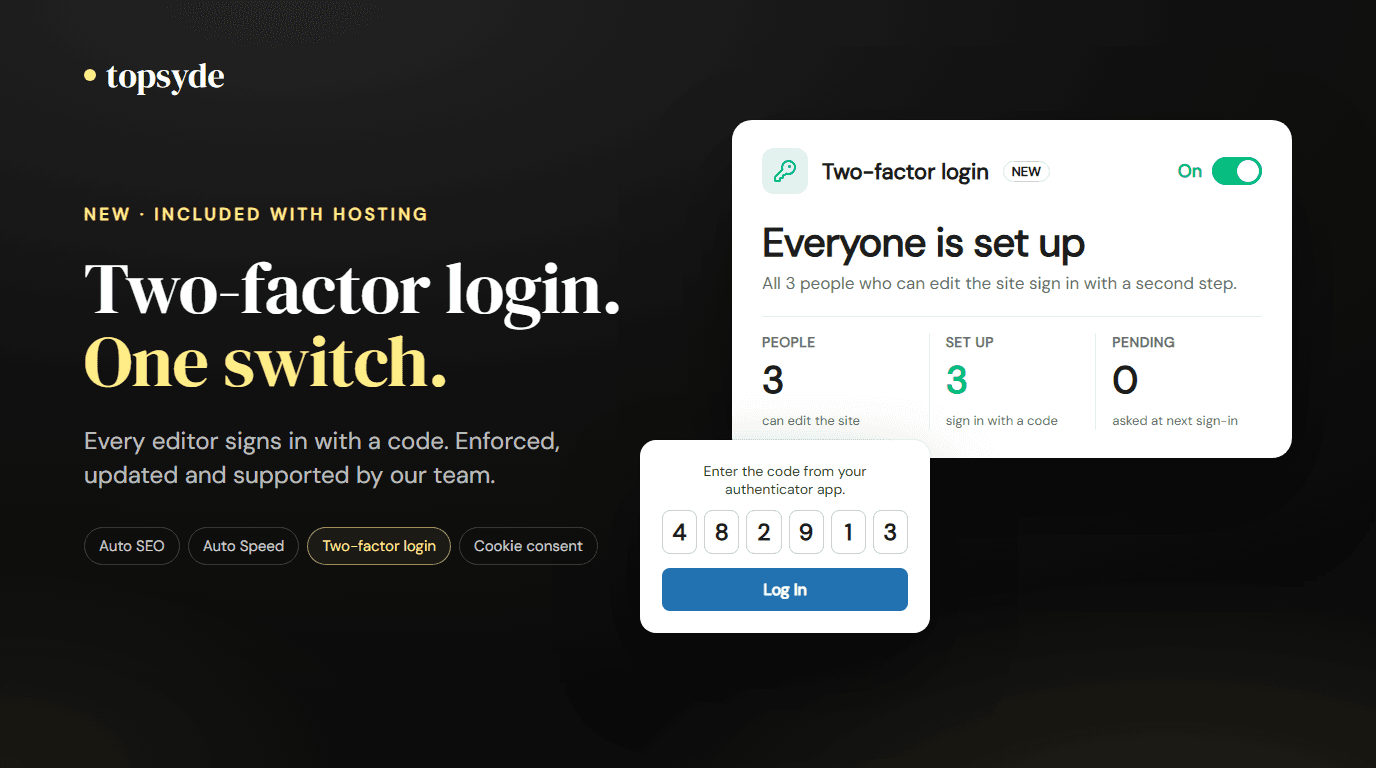

Most WordPress takeovers don't start with a clever exploit. They start with a password: reused from a breached site, guessed by a bot, or typed into a fake login page. Hiding the login page only cuts the bot noise. Two-factor login closes the door, because a password on its own no longer gets anyone into the dashboard.
Starting today, two-factor login is included with every TopSyde plan. It's a switch on each site's Dashboard tab in your portal. Turn it on, and everyone who can edit the site sets up a second step the next time they sign in. There's no plugin to shop for, no settings page to learn, and no one on your team stuck resetting a client's phone at 9pm.
It's one of eight tools we've built into hosting this month, next to Auto SEO, Auto Speed, cookie consent, form protection, broken links & 404s, database cleanup and AI edits. Together they cover jobs most sites pay separate plugins to do. We wrote up how Auto SEO and Auto Speed work last week.
What happens when you turn it on
You flip the switch on the site's Dashboard tab and accept a short agreement that explains what changes. From there, our side does the work over a secure connection to the site:
- We install the open-source Two Factor plugin. It's maintained by WordPress core contributors, and it handles the codes, the backup codes and the sign-in step.
- We add a small TopSyde enforcement layer on top. That layer is the part a plugin alone doesn't give you.
- The next time anyone who can edit the site opens the dashboard, WordPress sends them to their profile with a notice: this site requires two-factor login. The rest of the dashboard opens once they've set it up.
Setup takes a person about a minute. They scan a QR code with an authenticator app (Google Authenticator, 1Password, Authy, Microsoft Authenticator or any other app that makes six-digit codes), or choose codes by email. They also get a set of one-time backup codes to keep somewhere safe.
After that, signing in is a password plus a code. A stolen password gets an attacker as far as the code prompt and no further.
Why we enforce it instead of offering it
Plenty of security plugins can add two-factor login. Most of them make it optional, which is how a site ends up with 2FA "installed" and two of its four admins never set it up. Those two accounts are the ones an attacker uses.
Our layer makes it a requirement for everyone who can change the site. It also keeps the plugin running even if someone deactivates it from wp-admin, because the portal is the only off switch. An attacker who gets into one account can't turn protection off for the others, and neither can a well-meaning client tidying up their plugin list.
Visitors aren't affected. Shop customers, members and subscribers sign in exactly as they did before. The requirement applies to people with editing rights, because those are the accounts that can install code, change content or create new admins.
You can see who's covered
The two-factor card in your portal reads the site and lists everyone who can edit it, with their role and whether they've set it up:
- "Everyone is set up" when every editor signs in with a second step.
- "2 of 3 set up" while someone hasn't done it yet, with that person listed as "Not set up yet".
- Which method each person uses: authenticator app, email codes or backup codes.
For agencies, that card is the answer to a question you'll hear more often. Cyber-insurance applications, client security reviews and vendor questionnaires increasingly ask whether admin logins use multi-factor authentication. Now the answer is yes, with a screen to back it up.
Lost phones are our problem now
Turning two-factor login on is the easy part. The support that follows is harder. Someone gets a new phone without moving their authenticator app, and they're locked out the morning a client needs an update.
With TopSyde, a person can first sign in with one of their backup codes. If those are gone too, the site owner (or the person, from their own email address) opens a ticket. We verify who's asking, then reset that person's two-factor so they can set it up again. Nobody on your team needs server access or a WP-CLI command.
What it costs, and what it replaces
Two-factor login is included in every plan, starting at $89/site/month for hosting, maintenance, security and support. There's no setup fee and no per-user charge.
To be fair to the plugin market: basic two-factor login is often free. Wordfence, WP 2FA and miniOrange all offer it on a free tier, and premium versions add policies and grace periods for roughly $69 to $149 a year. The bigger cost has always been the work around the plugin. Someone has to choose one, enforce it for the right roles, keep it updated, and unlock people. We've seen an agency quote a client $350 just to set it up on one site.
That's the same trap as any free-plugin client build: the licence is cheap and the upkeep isn't. That work is part of the plan now. And because TopSyde already scans every site daily with Sentinel and runs Cloudflare's firewall at the edge, you don't need a full security suite on the site just to get a login code.
What it doesn't do
We'd rather you know the limits up front:
- It reduces the risk of a stolen or reused password being used. It doesn't make a site impossible to compromise.
- Until a person sets up their second step, their password still reaches the setup screen. If a site has been compromised, clean it up first and reset passwords before turning it on. The agreement you accept says this too.
- Email codes depend on the site's email delivery. An authenticator app is the stronger, more reliable choice, and the setup notice recommends it.
- It isn't available for WordPress multisite installs yet.
Turning it off removes the requirement and the plugin we installed. Everyone's authenticator setup is kept, so turning it back on later doesn't mean scanning QR codes again.
Frequently Asked Questions
Is two-factor login an extra charge?
No. It's included with every TopSyde hosting plan at no extra cost, and you choose per site whether to turn it on.
Who has to set it up?
Everyone who can edit the site: administrators, editors, authors, contributors and WooCommerce shop managers. Customers, members and subscribers are never asked. The site's TopSyde access account is exempt, because it's not a person and its password is never stored.
What if someone loses their phone?
They sign in with a backup code. If they've lost those too, open a ticket from the account email or the person's own email. We verify the request, then reset their two-factor so they can set it up again.
Does it replace my security plugin?
For the login step, yes. For scanning and malware removal, TopSyde Sentinel already covers every site daily. Before removing an existing security plugin, we review what else it does on your site so nothing you rely on disappears.
Can I try it before rolling it out to clients?
Yes. Turn it on for your own site first, set it up on your account, and watch the card update. Then switch it on for client sites one at a time.
Ready to lock the front door on every site you manage? See how two-factor login works or compare our plans.

Founder & Lead Developer
20+ years full-stack development, WordPress, AI tools & agents
Colton is the founder of TopSyde with 20+ years of full-stack development experience spanning WordPress, cloud infrastructure, and AI-powered tooling. He specializes in performance optimization, server architecture, and building AI agents for automated site management.