
If you run marketing on a WordPress site, you probably pay a consent platform every month: CookieYes, Complianz, Cookiebot, iubenda or one of a dozen others. Across a client portfolio, that's a subscription per domain, each with its own dashboard, scanner and settings to keep straight.
Starting today, TopSyde hosting includes cookie consent. It's a switch on each site's Dashboard tab. Turn it on, and the site gets a fast, accessible cookie banner, known trackers wait until visitors agree, Google tags keep working through Consent Mode v2, and every choice is recorded. We also scan the site's cookies and publish a Cookie Policy page for you.
It's one of eight tools we've built into hosting this month, alongside Auto SEO, Auto Speed, two-factor login, form protection, broken links & 404s, database cleanup and AI edits. At list price, the paid plans of the plugins those eight tools replace come to $745+ a year per site: Yoast SEO Premium ($118.80), WP Rocket ($59.95), Wordfence Premium ($149), CookieYes Pro ($250, the CookieYes plan that can ask only European visitors, like ours does), Akismet ($119.40) and WP-Optimize Premium ($49, up to 2 sites), checked 14 October 2026. Redirection and Broken Link Checker are free. Across ten client sites, with each vendor's multi-site or volume pricing, those paid plans list at $5,700+ a year.
The same card now holds a second switch: a Privacy Policy page generated only from what we detect on the site (the cookie scan, the trackers the banner sees, plugins that collect information, hosting and email) and kept up to date as that changes. It never overwrites a privacy page you wrote, and it's a starting point for you to review, not legal advice.
What visitors see
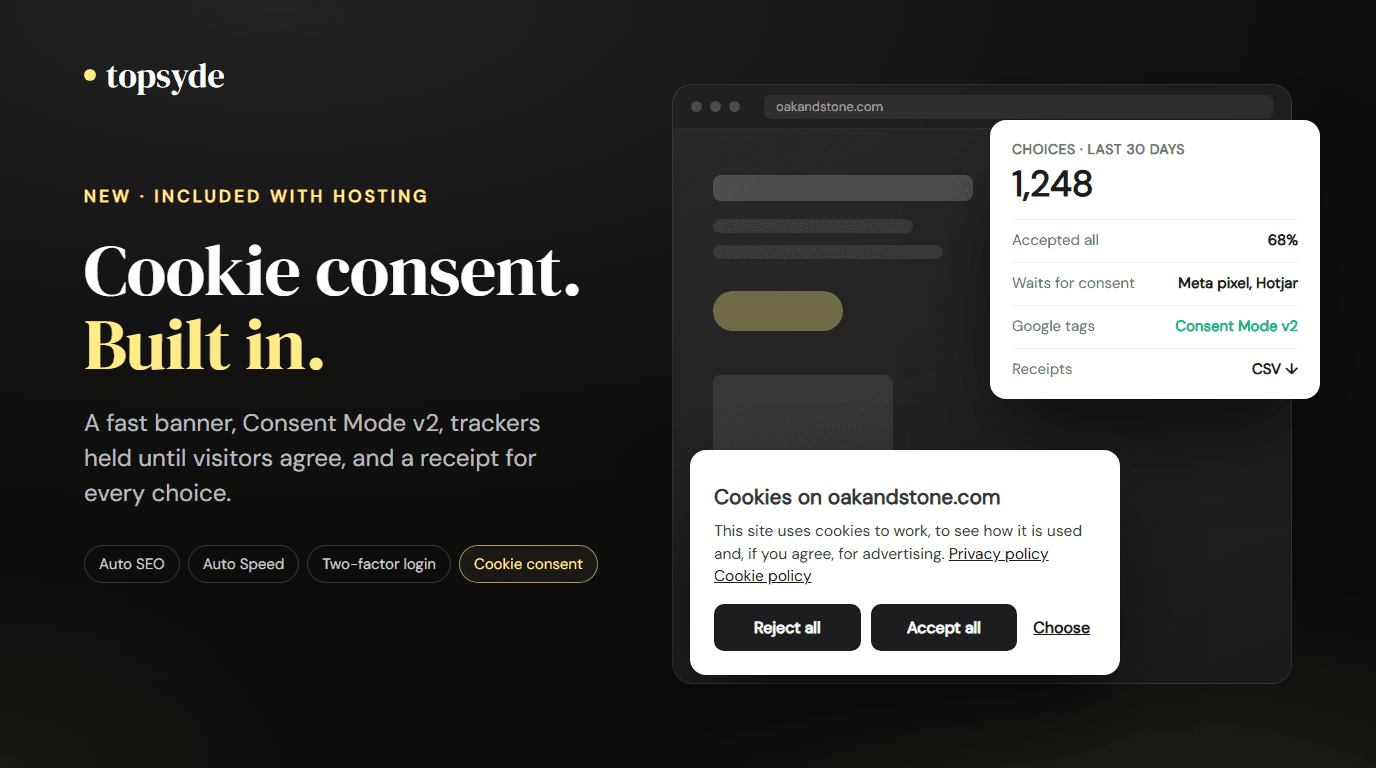
A small panel in the corner of the page: "Cookies on yoursite.com", one sentence about what the site uses cookies for, links to your privacy and cookie policies, and three buttons. Reject all and Accept all carry the same weight, because a banner that makes rejecting harder than accepting is exactly what European regulators have fined sites for. Choose opens three categories (preferences, statistics, marketing) with a plain description of each and, where we've found them, the services the site uses in that category.
After someone chooses, the banner closes and a small cookie button stays in the corner, so anyone can change their mind later. You can also link to the settings from your own footer with #cookie-settings.
The banner is keyboard and screen-reader friendly. It renders in its own sealed layer, so your theme's CSS can't break it, and it appears after the page settles, so it's never the largest thing on screen.
Who gets asked first
Our servers send the same cached page to everyone, which is part of why TopSyde sites are fast. So the banner decides in the visitor's browser, using the browser's time zone:
- Visitors in Europe, including the UK, Switzerland and the EU's overseas regions, see the banner before analytics and advertising cookies are set. No analytics or advertising cookies are set until they choose.
- Everyone else starts opted in and can opt out from the cookie button at any time. If their browser sends a Global Privacy Control signal, marketing is switched off for them automatically.
Time zone is an approximation of location. A visitor on a VPN or with an unusual device setting can be placed on the wrong side. For sites that need opt-in everywhere, such as a business with customers in Quebec or Brazil, one setting on the card asks every visitor first.
What gets held back, and what doesn't
This is where most free banners fall short: they show a notice but let every script run anyway. Ours rewrites known trackers so they don't run until their category is allowed:
- The Meta pixel, TikTok, LinkedIn Insight, Pinterest, X, Microsoft Ads, Snap, Reddit, Hotjar and Microsoft Clarity.
- Embedded YouTube, Vimeo, Google Maps, Facebook, Instagram, TikTok, X, Spotify, SoundCloud, Wistia and Loom content. In its place, the visitor sees a short note and a "Load" button.
- Scripts that a speed plugin like Perfmatters or WP Rocket has already delayed are held too.
Google tags are treated differently, on purpose. Google Analytics, Google Ads, Tag Manager and Site Kit load with Consent Mode v2 signals set before any of them run, and they don't set analytics or advertising cookies until the visitor agrees. That keeps your Google reporting working within what each visitor allowed, instead of losing it entirely. If you're setting tags up from scratch, our GA4 setup checklist covers the rest.
When a visitor withdraws consent for something that's already running, the page reloads so it stops.
Records you can hand over
Every choice is saved as a consent receipt in a table in your site's own database: a random ID, the time, the choices, which region rule applied and the banner version. We don't store IP addresses or browser details. Receipts are kept for 24 months, and a site admin can download them as a CSV from the portal whenever a client or auditor asks.
We also scan the site's cookies the way a visitor who accepted everything would see them, on the homepage and a few linked pages. Each cookie is matched to a known service and category, and the results feed a Cookie Policy page we create on the site. The scan repeats regularly, so the page keeps up as plugins change.
The portal card shows the numbers: choices in the last 30 days and how many accepted all, cookies found, and how many trackers and embeds are waiting for consent.
For agencies running many sites
If you host client sites with us, each site gets its own settings on the card: who is asked first, the button colour to match the brand, light or dark, and where the banner sits. If a site already runs CookieYes, Complianz, Cookiebot, iubenda or another consent plugin, ours stays off and the card names the plugin, so a site never shows two banners. When you're ready, tell us and we'll switch it over in one step.
What it doesn't do
We'd rather you choose this with the limits in view:
- It's a tool, not legal advice. No banner can make a site compliant on its own. You remain responsible for your privacy and cookie policies and for which trackers your site uses. If in doubt, ask a lawyer.
- The banner is in English only. Sites that need the banner in other languages should use a dedicated product.
- It doesn't implement the IAB TCF. If you run Google AdSense or Ad Manager ads to visitors in Europe, you need a TCF-certified platform.
- Trackers inside a Tag Manager container follow GTM's own consent settings. Scripts we don't recognise, and anything set by your server, aren't held.
- The cookie scan covers a few pages, so it can miss cookies that only appear deeper in the site or later.
When one of those applies, we'll tell you and help you set up a dedicated consent product instead.
Frequently Asked Questions
Does cookie consent cost extra?
No. It's included with every TopSyde hosting plan, starting at $89/site/month, and you turn it on per site.
Will Google Analytics still work?
Yes. Google tags are never blocked. They follow Consent Mode v2, so they load for every visitor but only set analytics and advertising cookies once the visitor agrees.
I already pay for CookieYes or Complianz. What happens?
Nothing, until you decide. Ours stays off while another consent plugin is active. When you want to switch, we turn the old banner off and ours on together, and you can cancel the old subscription.
Where are consent records stored?
In your own site's database, not on our servers. Each receipt holds a random ID, the time, the choices, the region rule and the banner version, with no IP address. You can export them as a CSV from the portal. More answers live in our FAQ.
Does the banner slow my site down?
It's designed to stay out of the way. It appears after the page settles, is never the largest element on screen, and works alongside Auto Speed and popular speed plugins.
Want one less subscription per client site? See how cookie consent works, read how Auto SEO and Auto Speed work, or read our guide to WordPress cookie consent rules for the background.

Founder & Lead Developer
20+ years full-stack development, WordPress, AI tools & agents
Colton is the founder of TopSyde with 20+ years of full-stack development experience spanning WordPress, cloud infrastructure, and AI-powered tooling. He specializes in performance optimization, server architecture, and building AI agents for automated site management.