
Ask anyone who runs a WordPress site what arrives through the contact form, and you get the same list: SEO pitches, crypto offers, "free redesign" mockups, the same message five times from five throwaway addresses. Most people live with it. The ones who don't install Akismet or bolt a CAPTCHA onto the form, and then a real enquiry gets caught and nobody notices for a week.
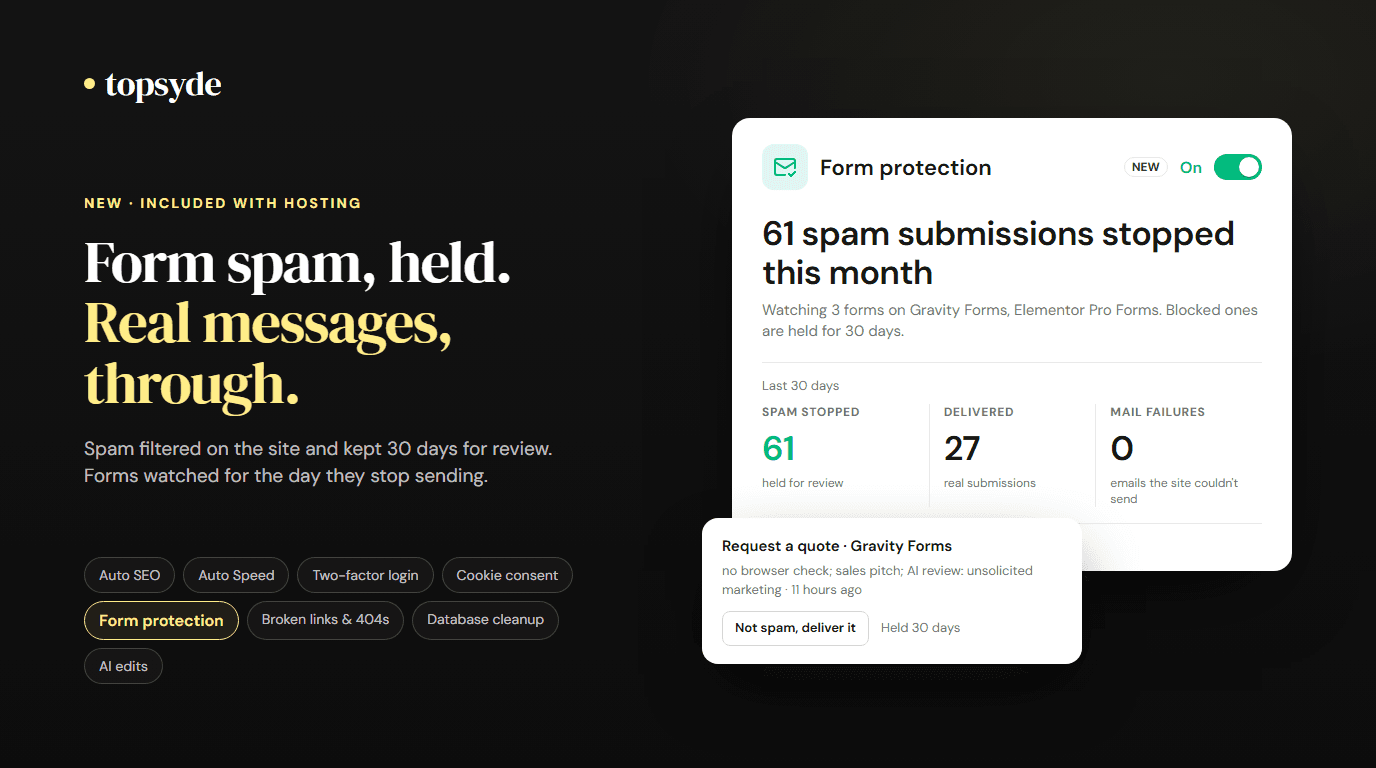
Starting today, TopSyde hosting includes form protection. It's a switch on each site's Dashboard tab. Turn it on, and submissions to the site's forms and comments are checked for spam on the site itself. Anything blocked is held for 30 days where you can read it and deliver it with one click. And because the most expensive form problem is the one you don't know about, the same switch watches for forms that stop sending.
It's one of eight tools now built into hosting, alongside Auto SEO, Auto Speed, two-factor login, cookie consent, broken links & 404s, database cleanup and AI edits.
How a submission is judged
The filter runs inside WordPress, at the point where each form plugin already decides whether a submission is spam, so a held Gravity Forms entry lands in its spam folder and a held comment sits in moderation. The checks run cheapest first:
- A hidden field. Real visitors never see it; bots fill it in.
- A browser check. A small script adds a proof token when a person interacts with the page. It's designed to work with full-page caching, so every visitor still gets the same fast cached HTML. A missing token on its own is never enough to block, because some visitors run with scripts off.
- Content rules. Links, the wording, throwaway email domains, the same message repeated.
- An AI check, only for the unclear ones. A submission that scores in the middle is sent for a second opinion: the text of the fields only, with email addresses and phone numbers masked and no IP address. We keep the verdict, not the content. If the check is slow or fails, the submission is accepted.
That last rule matters. A spam filter that fails closed turns a hiccup into lost leads. Ours fails open, every time.
Logged-in editors are never checked, and if the site already runs Akismet or a CAPTCHA, those keep working. Ours adds a layer and reports what else is on the site.
Nothing is thrown away
Every blocked submission is kept in the site's own database for 30 days, with the reason it was held: "SEO pitch; 3 links", "hidden field filled in", "same message sent repeatedly". The portal card lists them, and Not spam, deliver it does what it says. A Gravity Forms entry is restored and its notifications sent; a comment goes to moderation; for the other builders, the message is emailed to the form's recipient with Reply-To set to the sender. Delivering one also allowlists that sender, so the filter stops second-guessing them.
We'd rather you check the held list now and then than wonder whether a filter ate something. No filter is perfect. Some spam will get through, and once in a while a real message will be held. The 30-day hold is the safety net.
Forms that stop working get noticed
This is the part no spam plugin does, and the part behind most "the website is broken" calls we get. A contact form fails for a dozen reasons that have nothing to do with spam: the site's mailer breaks after a plugin update, a page builder change hides the form, a PHP error takes the page down. The form keeps looking fine to the owner, and the enquiries just stop.
With form protection on, we watch three things:
- Email errors on the site. Every failed
wp_mailcall is counted, with the form and the error, never the message body. - Forms that go quiet. We keep daily submission counts per form. A form that normally gets a message every few days and then gets nothing for weeks shows up as "has gone quiet" on the card.
- Form pages that stop rendering. A daily check reads the pages where real submissions came from and confirms the form is still there.
A new alert emails our team and shows on the site's card. We never email your client about it; they hear from you, or from the monthly report. The card also warns when a site has neither TopSyde Mail nor an SMTP plugin, because a form on the server's basic mailer is a form waiting to fail. If you want to prove delivery, Send test sends one labelled email through the site's own mailer to the address you choose. We never submit test entries into your forms.
What it costs, and what it replaces
Form protection is included in every plan, starting at $89/site/month for hosting, maintenance, security and support. There's no per-site or per-form charge.
For comparison, Akismet's commercial plan lists at $9.95 a month per site, billed yearly, as of October 2026, and its personal plan is for personal sites only. Free alternatives exist, and so do CAPTCHAs, which push the work onto your visitors and still miss spam typed by a person. Akismet's paid plan is one of the six counted in the plugin-stack figure we publish, which adds up the paid plans of the plugins our built-in tools replace at list price.
If your forms themselves need work, the contact form guide covers the parts a filter can't fix.
What it doesn't do
- It doesn't guarantee that all spam is stopped or that every message is delivered. Delivery still depends on the site's mailer, which is why mail failures are counted.
- It doesn't check logged-in editors, and it doesn't stand down other spam tools; it adds a layer.
- On a WordPress multisite network, one switch protects every site's forms, and held submissions show which site they came from.
Turning it off removes the filter at once. Submissions already held stay on the site until they age out after 30 days, and you can still deliver them from the portal until then.
Frequently Asked Questions
Is form protection an extra charge?
No. It's included with every TopSyde hosting plan, and you choose per site whether to turn it on.
Which form plugins does it work with?
Gravity Forms, Contact Form 7, Elementor Pro forms, WPForms, Fluent Forms, Ninja Forms and Formidable, plus WordPress comments. If none of those is active, the switch waits and starts filtering as soon as one is.
Does it send my visitors' messages to an AI?
Only the ones the on-site checks can't decide, and only the text of the fields, with email addresses and phone numbers masked and no IP address. We store the verdict and its cost, not the content.
Will you tell my clients when a form breaks?
No. Alerts go to our team and show on the site's card in your portal. You decide what to tell the client.
Can I keep Akismet?
Yes. Other spam tools keep running and the card names them. Most sites won't need both, and we'll review what else a plugin does before removing it.
Ready to stop reading crypto pitches before breakfast? See how form protection works or compare our plans.

Founder & Lead Developer
20+ years full-stack development, WordPress, AI tools & agents
Colton is the founder of TopSyde with 20+ years of full-stack development experience spanning WordPress, cloud infrastructure, and AI-powered tooling. He specializes in performance optimization, server architecture, and building AI agents for automated site management.